

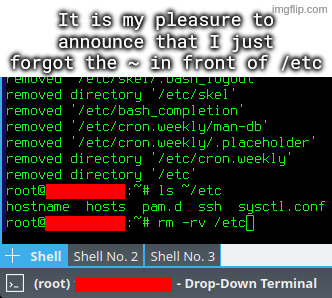
I accidentally untarred archive intended to be extracted in root directory, which among others included some files for /etc directory.
I went on to rm -rv ~/etc, but I quickly typed rm -rv /etc instead, and hit enter, while using a root account.
Could make one archive intended to be unpacked from /etc/ and one archive that’s intended to be unpacked from /home/Alice/ , that way they wouldn’t need to be root for the user bit, and there would never be an etc directory to delete. And if they run tar test (t) and pwd first, they could check the intended actions were correct before running the full tar. Some tools can be dangerous, so the user should be aware, and have safety measures.
they acquired a tar package from somewhere else. the instructions said to extract it to the root directory (because of its file structure). they accidentally extracted it to their home dir
that is how this happened. not anything like what you were saying
I understand that they were intending to unpack from / and they unpacked from /home/ instead. I’m just arguing that the unpack was already a potentially dangerous action, especially if it had the potential to overwrite any system file on the drive. It’s in the category of “don’t run stuff unless you are certain of what it will do”. For this reason it would make sense to have some way of checking it was correct before running it. Any rms to clean up files will need similar steps before running as well. Yes this is slower, but would argue deleting /etc by mistake and fixing it is slower still.
I’m suggesting 3 things:
Check the contents:
Confirm where:
Have backups:
I’m not suggesting that everyone knows they should do this. But I’m saying that problems are only avoidable by being extra careful. And with experience people build a knowledge of what may be dangerous and how to prevent that danger. If pwd is /, be extra careful, typos here may have greater consequences. Always type the full path, always use tab completion and use “trash-cli” instead of rm would be ways to make rm safer.
If you’re going to be overwriting system files as root, or deleting files without checking, I would argue that’s where the error happened. If they want to do this casually without checking first, they have to accept it may cause problems or loss of data.